


Copart - Online Auto Auctions
4.83.47K Reviews
App Specs
- Version
- 6.8.1
- Updated On
- License
- Free
- Downloads
- 5,000,000+
- Developer
- Copart
- Categories
- Shopping
- Platform
- Android, iOS
Screenshots
 Analysis by AppCompare
I approach Copart with a different mindset than I use for ordinary car shopping. This is an auction app, so the useful question is not simply whether I like a vehicle, but whether I can research it, judge the risks, and keep the whole purchase process manageable. That makes Copart - Online Auto Auctions most interesting to buyers who are comfortable doing homework before making a commitment.
Start with a shortlist, not a bid
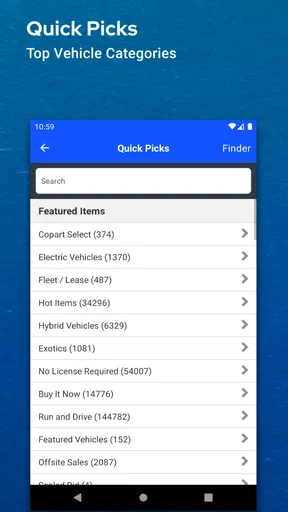
When I’m browsing cars on a phone, it’s easy to let an appealing photo pull me toward a listing before I’ve thought through what I actually need. Copart’s search and filters give me a better starting point: I can narrow the field by make, model, year, and auction type, then save promising options instead of treating every result as a contender.
A practical approach is to write down the requirements that matter before searching: the kind of vehicle, the work it may need, and the maximum amount I’m prepared to spend overall. That last figure should account for more than the bid itself. I would also think through transport, repairs, and the time required to sort out the next steps. An auction win can be a poor deal if the vehicle’s condition or location makes the rest of the process impractical.
Build a repeatable research routine
For each serious candidate, I’d use the listing details and photos to make a consistent comparison rather than relying on memory. I’d note visible damage, missing or unclear information, and questions that need answering before I bid. Photos can help me spot areas worth investigating, but they are not a substitute for seeing a vehicle or arranging an independent inspection when that is possible.
The app’s Watchlist is useful here because it separates “worth a closer look” from “ready to bid.” I can follow several possibilities while checking them against the same criteria. That is a small but valuable discipline: a watchlisted vehicle is still only a candidate, not a bargain. If a detail is unclear, I would treat that uncertainty as part of the decision instead of filling it in with an optimistic guess.
Vehicle Finder can make the search less repetitive when I have a specific kind of car in mind. Rather than reopening the same searches throughout the day, I can use the alert approach to notice matching additions and then assess each one on its own merits. It works best when the criteria are focused; a very broad search may bring more options than I can sensibly review.
Keep the auction moment separate from the decision
Pre-bidding and live bidding serve different moments in the workflow. A pre-bid lets me register interest before the live event, while live bidding puts me into the changing pace of the auction. Either way, I’d decide my ceiling before the countdown becomes exciting. A bid limit written down in advance is more useful than a promise to “stop when it feels too high,” because the pressure of a close contest can make that line move.
Worth Reading Before You Choose

Flipboard Shows What News Apps Must Do Beyond the Feed

Switching to Android Auto Means Rethinking Your Driving Routine

Google Calendar Makes a Crowded Week Easier to Manage

Ludo King Makes the Most of the Minutes Between Plans

Baby Panda World Brings Quick Play to Modern Phones, but Its Game Library Feels Busy

ESPN’s Live Game View Makes Following Close Games Easier
Notifications help me keep track of bids without watching the app constantly, but an alert is a prompt to check the situation, not a reason to raise my limit. I’d also avoid treating the countdown as proof that I have fully evaluated the car. If I still have unanswered questions, stepping away is often the sensible outcome. Missing one auction is easier to recover from than winning a vehicle that I have not properly assessed.
Know where the phone hands off to real-world work
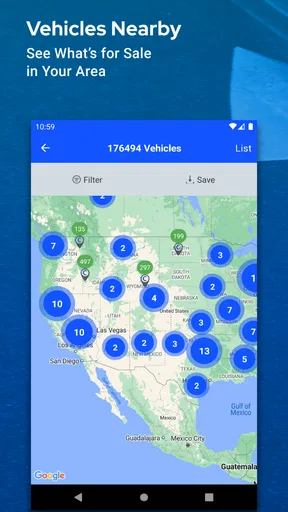
The app can bring search, listing review, and bidding together, but a vehicle purchase does not end at the screen. Before getting involved, I’d work out what I need to do after a successful bid: how I’ll arrange an inspection if appropriate, how I’ll handle collection or transport, and whether I have the skills, budget, or help needed for repairs. Those practical details can change which listings make sense, especially when a car is far away.
This is where Copart differs from browsing a typical dealer inventory or local classified ads. Those options may suit someone who wants to see a car in person, ask questions face to face, or focus on a ready-to-drive vehicle. An auction app is better for someone willing to compare listings, accept uncertainty, and take responsibility for the follow-through. I would not choose it as my first stop if I needed a straightforward daily driver immediately and had little room for repair or transport complications.
For example, if I were looking for a project car around my existing schedule, I could shortlist vehicles during a coffee break, use the Watchlist to compare them later, and check a Vehicle Finder alert when a closer match appears. Before bidding, I’d verify that the condition and location fit my plan and decide the maximum total commitment I can tolerate. If I couldn’t make those checks in time, I’d leave that auction alone rather than mistake convenience for certainty.
There is also a difference between finding a vehicle and being ready to buy it. The app makes discovery and auction participation more convenient, but a phone cannot remove the judgment calls involved in assessing damage, estimating work, or planning the handoff. That trade-off is central to deciding whether this kind of shopping suits you.
Getting Started with Copart
The first thing you’ll notice when you download the Copart - Online Auto Auctions app is its user-friendly interface. Setting up an account is a breeze. You’ll need to register, which involves providing some basic information, but once you’re in, you’re ready to explore a world of cars. The app is available for both Android and iOS, so whatever your device, you’re covered.
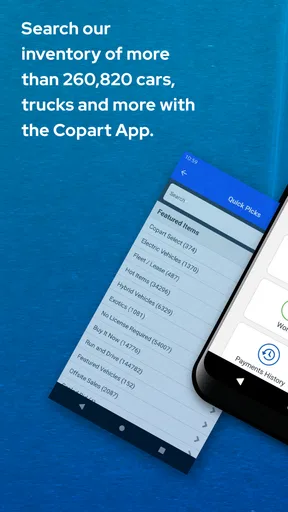
Upon opening the app, you’re greeted with a clean, intuitive layout. The search bar is your best friend here. You can filter searches by make, model, year, and even the type of auction. Whether you’re looking for a reliable sedan or a classic muscle car, Copart’s got you covered. And the best part? You can do all this while sipping your morning coffee.
The Bidding Experience
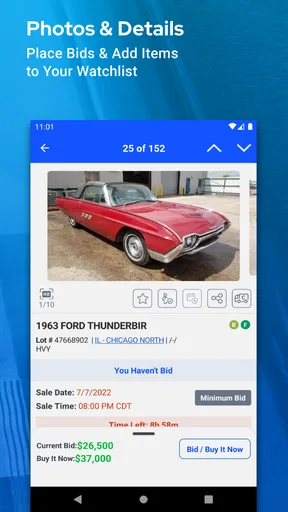
Now, let’s talk about the heart of the app—the auctions. Each vehicle listing includes detailed information, multiple photos, and a vehicle history report. This transparency is crucial, especially when buying a car sight unseen. I was impressed by the level of detail provided, which definitely helps in making informed decisions.
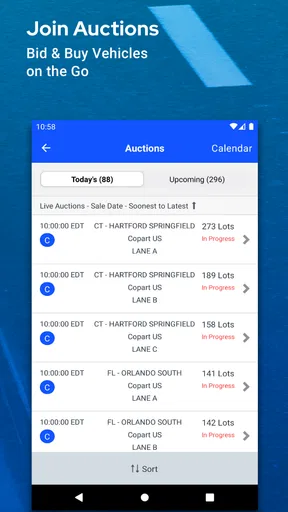
Bidding is straightforward. You can place pre-bids before the auction starts or participate in live bidding. The adrenaline rush is real, folks. Watching the countdown and hoping for the best outcome is exhilarating. But don’t worry, the app sends notifications to keep you updated on your bids, so you won’t miss out on your dream car.
Features Worth Mentioning
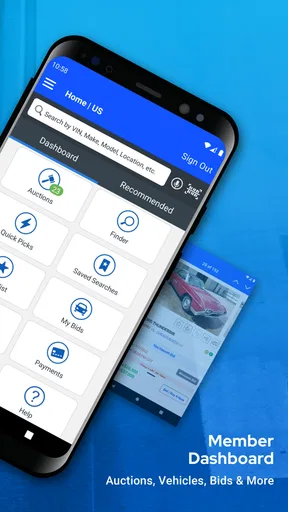
One feature I really appreciated is the Virtual Bidding feature. It allows you to participate in auctions as if you were there in person, which is particularly handy if you’re eyeing cars located far away. Also, the app offers a "Watchlist" feature where you can keep track of vehicles you’re interested in. This is perfect for those of us who like to weigh our options.
Another handy feature is the Vehicle Finder. It’s essentially a personalized alert system that informs you when cars matching your criteria are added. I found this feature incredibly useful as it saves a lot of time and effort, and you get first dibs on new listings.
Things to Consider
While the app is fantastic, it’s not without its quirks. For instance, some users have reported occasional crashes, though I didn’t encounter this during my use. It’s also important to remember that you’re buying cars "as-is". While the app provides a lot of information, it’s always wise to do your homework and maybe even arrange for an independent inspection if possible.
Also, considering that it’s an auction platform, prices can fluctuate, and sometimes, you might get caught in a bidding war. It’s crucial to set a budget and stick to it, no matter how tempting that shiny sports car might be.
Final Thoughts
All in all, the Copart - Online Auto Auctions app is a fantastic resource for anyone in the market for a vehicle. It combines the thrill of an auction with the convenience of online shopping. With its range of features and user-friendly interface, it’s definitely worth checking out if you’re looking to buy a car without the hassle of visiting multiple dealerships.
Copart is a shopping app developed by Copart. It’s free, has an Everyone age rating, and version 6.7.5 is available for devices running OS 9 or later. Its 4.8 average from around 60,000 ratings and over 5 million installs suggest that it has reached a substantial audience, though popularity alone can’t tell me whether auction buying suits a particular person. It was released on July 2, 2015, and the app continues to make the most sense when I treat it as a research and bidding tool, not a shortcut around the responsibilities of buying a vehicle.
For someone who enjoys comparing cars, can pause before bidding, and has a realistic plan for what happens after an auction, that distinction is a strength. For someone who needs a predictable purchase with minimal follow-up, a conventional dealer or a local seller may be a better fit. I’d use Copart when I’m prepared to investigate carefully and walk away if the numbers or condition do not make sense.
So, if you’re ready to embark on your car buying journey, download the app, get registered, and start bidding. Who knows, your dream car might just be a click away. Happy hunting!
Pros
- User-friendly interface for easy navigation.
- Wide selection of vehicles available.
- Real-time auction updates.
- Detailed vehicle information provided.
- Efficient bidding process.
Cons
- Limited customer support options.
- Requires membership for full access.
- Occasional app performance issues.
- High competition in popular auctions.
- Fees can be unclear at times.
FAQs for Copart - Online Auto Auctions
What is Copart - Online Auto Auctions and how does it work?
Copart - Online Auto Auctions is an app that allows users to participate in online auto auctions. It provides access to a vast inventory of vehicles, including cars, trucks, and SUVs. Users can browse listings, place bids, and manage their auction activity directly from the app, making it convenient for both buyers and sellers.
Is registration required to use Copart, and is there a fee involved?
Yes, registration is required to access the full features of the Copart app. While browsing the inventory is free, participating in auctions requires a membership, which can involve a fee. There are different membership levels, each offering varying benefits, so users should choose one that aligns with their needs.
What types of vehicles can be found on Copart, and are they all in good condition?
Copart offers a diverse range of vehicles, including cars, trucks, SUVs, motorcycles, and more. The condition of vehicles varies widely, from brand-new to salvage. Each listing includes detailed information about the vehicle’s condition, history, and any damage, allowing users to make informed decisions.
How can I ensure the safety and security of transactions on Copart?
Copart employs robust security measures to protect users’ personal and financial information. The app uses secure payment gateways and provides guidelines for safe buying practices. Users are encouraged to review these guidelines and to verify vehicle details thoroughly before making any purchase.
What support is available if I encounter issues while using Copart?
Copart offers comprehensive customer support to assist users with any issues. Support is available via phone, email, and live chat. Additionally, the app includes a Help Center with FAQs and guides that cover common queries and troubleshooting steps, ensuring users can resolve issues efficiently.


